
01
Mailboxes for people, and addresses for roles
One per staff member, plus the addresses your business needs rather than a person: info@, sales@, billing@, support@, careers@. Role addresses survive resignations; personal ones do not.
Your #1 Technology Partner · Cainta, Rizal · 24/7 AI-assisted support
Cloud Hosting, Domains & IT
Addresses that look like your business and land in the inbox instead of the spam folder.
Email hosting in the Philippines is the cheapest credibility you will ever buy. A quote from a Gmail address and the same quote from sales@yourcompany.com read differently, and buyers notice.
An animated Messenger thread in which a late-night customer enquiry arrives at a closed shop, an assistant drafts and sends a reply, and the customer's details are saved as a new contact record.
Answer every late-night enquiry, and keep each customer's details on file.
Company domain emails in every build package
Plus DMARC set on every domain we host
Businesses running on VenderIT Cloud
Uptime guarantee on the platform your mail runs on
One per staff member, plus the addresses your business needs rather than a person: info@, sales@, billing@, support@, careers@. Role addresses survive resignations; personal ones do not.
SPF, DKIM and DMARC published on your domain, reverse DNS checked, and your sending domain aligned. This is the difference between mail that arrives and mail that quietly lands in spam while you wonder why nobody replied.
Junk, malware attachments and obvious spoofs stopped at the gateway, with a quarantine you can review so a real enquiry never disappears silently. Filters are tuned for the senders you actually deal with.
Outlook on a desktop, the Gmail or Apple Mail app on a phone, or webmail from any browser. Everything runs over IMAP with TLS, so the same mail and folders appear on every device instead of one machine hoarding it.
Enquiries to info@ visible to the whole front desk, sales@ forwarding to two people, an alias for a campaign, an out-of-office set for someone on leave. Set once by us, changed whenever you ask.
New starter created before day one, leaver's mailbox forwarded to a manager and then archived, passwords reset, access removed. The mail belongs to the business, so a resignation never takes a client history with it.
We list your people, the role addresses your business actually uses, who needs shared access, and the storage each mailbox realistically needs.
You get: A mailbox, alias and forwarding plan
Accounts created on your domain, MX records pointed, SPF, DKIM and DMARC published, and test mail sent to major providers to confirm placement.
You get: Live mailboxes with deliverability verified
Existing messages, folders, contacts and calendars copied across and checked against the source before the old service is switched off. Nothing is deleted until you confirm.
You get: Old mail and folders intact on the new host
Desktops and phones set up for each person, webmail shown to those who prefer it, and a one-page guide for anyone joining later.
You get: Staff working on desktop and mobile, with a setup guide
Bounce rates, spam reports and DMARC results reviewed, filters tuned, and mailboxes added or archived as your team changes.
You get: Ongoing mailbox support through my.venderit.com
What we build with
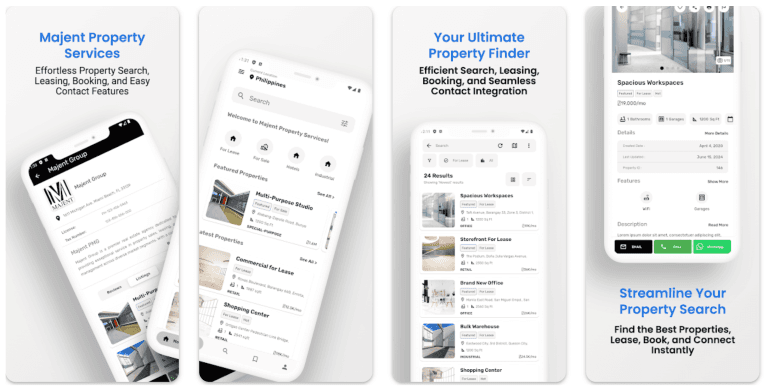
Property & Leasing
Commercial leasing site with property listings and enquiry capture, where the enquiries land in mailboxes on the company domain rather than one agent's personal inbox.
Read the case study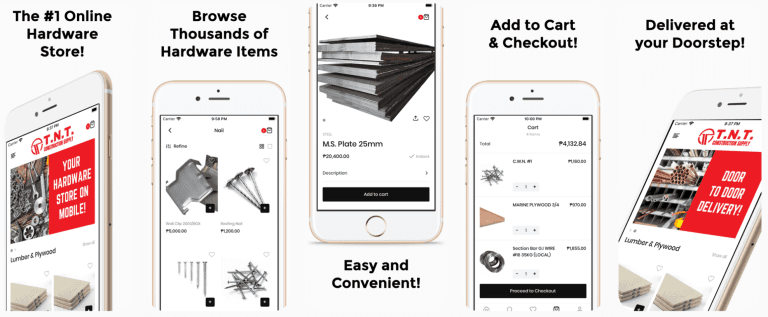
Construction Supply
Orders and supply enquiries arriving at addresses on the company domain rather than a personal inbox nobody else can see.
Read the case studyPlan your project
Tell us what you need to improve. We will recommend the right scope and practical next step before preparing a proposal.
Questions
Something not covered? Message us — a real person from the team replies, usually the same day.
Ask us directlyBecause customers read the address. A quotation from yourbusiness2024@gmail.com invites doubt, especially on a big-ticket purchase, and it is trivially easy for anyone to imitate. A company address on your own domain costs nothing extra with any of our packages, keeps the mail with the business rather than with one person's private account, and lets us set the records that keep your messages out of spam.
Every build package includes company domain emails for your team, and we size the plan around the list of people and role addresses you give us at setup. Adding a mailbox later takes minutes — tell us the name and we create it, set the password policy and help the person connect their phone. Extra mailboxes beyond your plan are quoted as a fixed monthly figure, not billed per request.
Nine times out of ten the sending records are missing or wrong. SPF says which servers may send as your domain, DKIM signs the message so it cannot be tampered with, and DMARC tells receivers what to do when a message fails either. Without them, Gmail and Outlook treat your mail as suspicious. We publish all three, test placement against the major providers, and check bounce and spam reports afterwards.
Yes. Everything runs on standard IMAP and SMTP over TLS, so Outlook, Apple Mail, the Gmail app and Thunderbird all work — and because it is IMAP, the same folders and messages appear on every device instead of one laptop holding the only copy. We set up each person's desktop and phone during the handover and leave a one-page guide for new staff.
Yes. We copy the messages, folders, contacts and calendars across, then check the new mailbox against the old one before anything is switched off. The old service stays live during the move and nothing is deleted until you confirm the count looks right. Large archives take longer, so we schedule those overnight rather than in the middle of a working day.
You decide, and you can act immediately because the mailbox belongs to the business. The usual sequence is: reset the password so access stops, forward incoming mail to their manager for a set period, hand over the folder history, then archive the mailbox and turn it off. Client conversations stay with you instead of walking out with a personal account.
Yes, and most businesses should. We set up shared inboxes and distribution addresses so enquiries reach everyone who needs them, and nothing sits unanswered because the one person holding the login is on leave. Add the free 24/7 AI assistant on your website and most routine questions are answered before they ever reach that inbox.
Tell us how your business works. We'll come back with a clear recommendation, a timeline and a price — no obligation.