
01
Search that follows the buyer
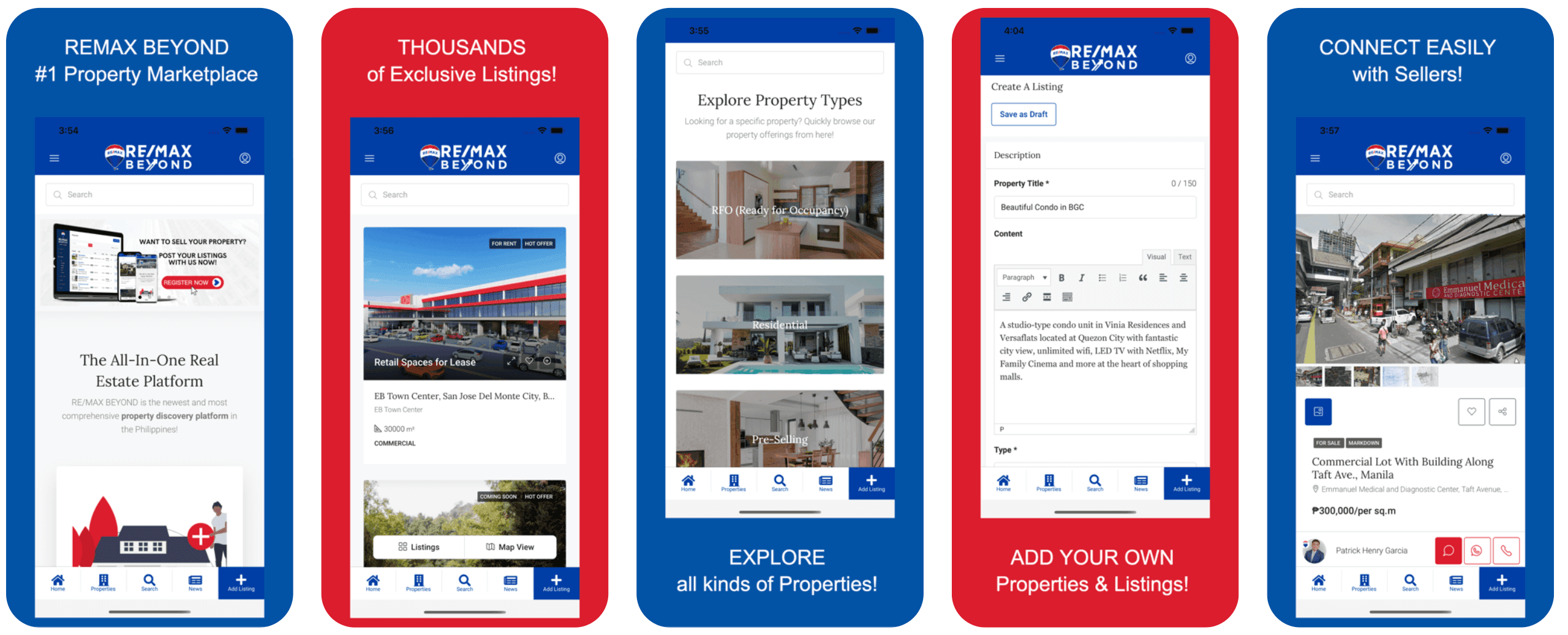
The search field sits above the content on the home screen, the listings feed, the Explore Property Types page and the listing detail view. Wherever a buyer changes their mind, the box is already there.
Your #1 Technology Partner · Cainta, Rizal · 24/7 AI-assisted support
Real Estate
A property marketplace with a Listings and Map View toggle, RFO and pre-selling browsing, and a self-serve listing builder.
RE/MAX BEYOND is a property discovery app for the Philippine market, and it carries both sides of the trade.
The brief
Property in the Philippines is sold across several vocabularies at once. A buyer who wants to move in next month is shopping for RFO. A buyer with a longer horizon is shopping pre-selling, where the unit does not exist yet. A tenant is shopping floor area on a road they can picture — a 30,000 m² retail space at EB Town Center in San Jose Del Monte City is a different decision from a studio condo. One undifferentiated feed of 'properties' serves none of them. RE/MAX BEYOND had to hold residential and commercial, sale and rent, ready and unbuilt in a single catalogue, and still let a seller with no technical background put a property on it.
What we built
The search field sits above the content on the home screen, the listings feed, the Explore Property Types page and the listing detail view. Wherever a buyer changes their mind, the box is already there.
Two buttons under the feed, one catalogue behind them. Scan the list when you are comparing prices, switch to Map View when the question is where the property actually sits.
RFO (Ready for Occupancy), Residential and Pre-Selling as full-width image tiles, under the line 'Looking for a specific property? Quickly browse our property offerings from here!' Three different buyers, three doors.
For Rent, Hot Offer and Coming Soon ride on the listing photo, with the location, floor area and type underneath — a retail space at EB Town Center reads as 30,000 m² COMMERCIAL before anyone taps.
A required Property Title capped at 150 characters with a live counter, a description editor with Visual and Text tabs and a formatting toolbar, a required Type field, and Save as Draft so a half-finished listing never goes live by accident.
Photo gallery with a thumbnail strip, save, favourite and share, the location line, then the price the way that asset is quoted — ₱300,000 per sq.m on a commercial lot along Taft Avenue, Manila — with the named seller and chat, WhatsApp and call buttons beside them.
A catalogue with search, a map view, property-type browsing, detail pages and enquiry routing is a Business build, live in about 15 working days, and it carries branded Android and iOS apps alongside the site, quoted after a short discovery call. A self-serve listing builder for outside sellers, as RE/MAX BEYOND has, is custom work outside the packages and is quoted separately. Unlimited listings and unlimited users are included, so a growing catalogue never changes the price.
Yes, and keeping them apart is the point. RE/MAX BEYOND gives RFO (Ready for Occupancy), Residential and Pre-Selling their own entry tiles, because a buyer who can move in next month and a buyer waiting on turnover are shopping for different things. The badge set on the listing photo includes Coming Soon, so a unit that is not ready yet can say so on the card.
Offer both. A lot of a property decision is commute, neighbourhood and which side of the highway the lot sits on, and none of that survives a text address. RE/MAX BEYOND puts Listings and Map View side by side over the same catalogue, so buyers who think in prices and buyers who think in locations are both served without maintaining two sets of data.
Nobody technical. The Create A Listing form has a description editor with Visual and Text tabs and a toolbar for bold, italics, bulleted and numbered lists, quotes, alignment, links and images. Save as Draft holds the listing until the photos and the price are confirmed. Training and documentation are included at handover, and the admin panel and CMS are yours to run.
Yes. Every listing detail page in RE/MAX BEYOND carries the named contact with chat, WhatsApp and call buttons together in one row, because a buyer will use exactly one of those and it is not your choice which. The free lifetime 24/7 AI assistant included in every build can answer the routine questions — price, location, availability — before a person picks up.

Beauty & Wellness
A beauty creator's own app: a make-up reviews section, a look grid and a lifestyle mosaic feed.

Automotive
A used-car marketplace where buyers browse by brand and sellers list a car in minutes.

Restaurants & Food
A 24/7 silog delivery app with a buy-1-take-1 menu and PayMongo checkout.
Tell us how your business works. We will come back with scope, timeline and a price — packages start at ₱99,000.