VENDERIT
Get a Quote

Mobile App Development

iOS App Development in the Philippines for iPhone and iPad

Your app on your customers' iPhones, through Apple's review, without you ever opening Xcode.

iOS app development in the Philippines earns its budget when your buyers carry iPhones — property, beauty, travel and professional-services customers often do, and so do buyers you sell to in the US, Australia or the Gulf.

App · installed

A phone cycling through the home, service, booking and profile screens of a Philippine home-services app, ringed by home-screen icon, push notification, offline sync and app-store cards.

Your own app on their phone — booking you in a few taps, signal or not.

You test on your own iPhone before Apple does
TestFlight

You test on your own iPhone before Apple does

Business package covers the App Store and Google Play
₱199K

Business package covers the App Store and Google Play

Flutter ships iPhone and Android together
1 codebase

Flutter ships iPhone and Android together

Free support and warranty after launch
1 year

Free support and warranty after launch

What's included

01

An iPhone and iPad build, not a stretched phone app

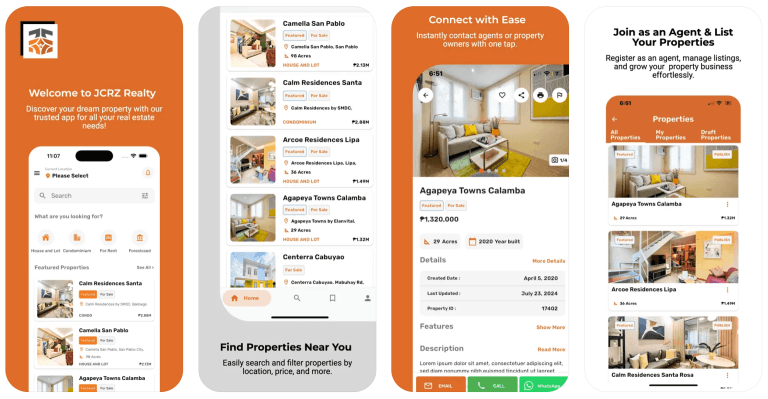
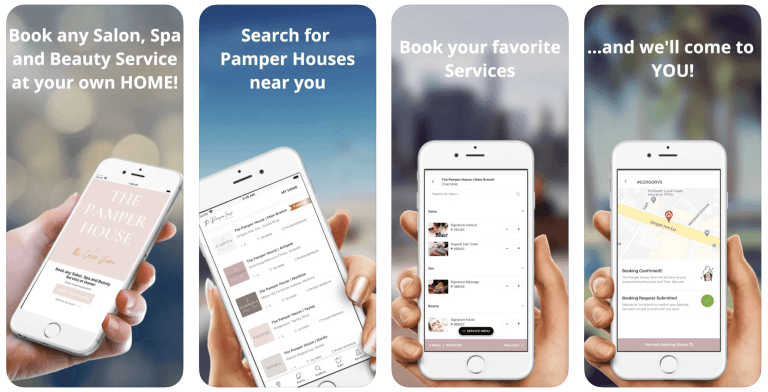
iPhone layouts designed for one-handed use, and proper iPad layouts where they earn their cost — agents presenting listings, staff taking bookings at a counter, showroom use. If your customers are only ever on phones, we say so and skip it.
02

TestFlight before Apple sees it

We push builds to Apple's own beta system so you and your staff install the app by invite and use it on real iPhones. Feedback comes back with screenshots and crash reports attached, which is the cheapest possible place to find out a button is in the wrong spot.

03

App Store Connect handled for you

Signing certificates, provisioning, app icon, screenshots at every size Apple demands, privacy nutrition labels, age rating, review notes and demo credentials. You keep the developer account in your business name and we publish under it.

04

Designed to Apple's conventions

Apple's Human Interface Guidelines for navigation, the back-swipe, system typography and share sheets, plus Dynamic Type, dark mode and safe areas around the Dynamic Island. iPhone users notice when an app was designed for Android and shipped twice.

05

Sign in with Apple and Apple push

Apple requires Sign in with Apple wherever you offer Google or Facebook login, so we build it in rather than getting rejected for it. Push notifications run through Apple's own service, fired from your admin panel.

06

Rebuilds when iOS changes

A new iOS lands every September and Apple eventually requires apps to be rebuilt against a newer SDK to stay updatable. We handle those rebuilds — free during your warranty year, under support afterwards.

How we work

  1. STEP 1

    Scope the iOS version specifically

    We agree which devices you actually need — iPhone only, or iPhone and iPad — and which two or three jobs the app must do on Apple hardware.

    You get: A written iOS feature list and device matrix

  2. STEP 2

    Design to Apple's guidelines

    Screens drawn to iOS conventions and reviewed on a real iPhone, so you feel the taps and the scroll before anything is built.

    You get: Approved iPhone and iPad screens

  3. STEP 3

    Build and sign

    One Flutter codebase compiled to a real iOS app, wired to your backend, admin panel, payments and AI assistant, then signed against your developer account.

    You get: A signed build uploaded to App Store Connect

  4. STEP 4

    Run a TestFlight round

    Your team and a small group of customers use the app on their own iPhones over mobile data. We fix what they find before Apple ever looks at it.

    You get: A TestFlight build on your team's phones and a closed defect list

  5. STEP 5

    Submit, publish and support

    We file the submission with clean privacy labels and review notes, answer the reviewer, and stay on it if anything comes back.

    You get: A live App Store listing under your own developer account

What we build with

  • Flutter
  • Dart
  • Swift
  • Xcode
  • App Store Connect
  • TestFlight
  • Apple Push Notification service
  • Sign in with Apple
  • Firebase

Projects we've delivered

Pricing

iOS builds from ₱199,000 — the Business package covers both the App Store and Google Play

Pro at ₱149,000 includes a branded Android app with your website in 10 working days; adding iOS to it is quoted on top rather than from scratch, because it comes off the same Flutter codebase. Business at ₱199,000 is the 15-day build covering both stores with custom workflows and integrations. 50% down, the rest against milestones. Apple's yearly developer account fee is billed to you directly. Every package includes the lifetime AI assistant, admin panel, cloud hosting, company emails, training and a 1-year warranty.

See what's included

Questions

Answers before you ask

Something not covered? Message us — a real person from the team replies, usually the same day.

Ask us directly

Android runs on most phones here, so if the budget only stretches to one, start there — our ₱149,000 Pro package includes a branded Android app. iOS earns its place when your customers skew higher income, when you sell property, beauty, travel or professional services, or when you also sell to buyers in the US, Australia or the Gulf. On Flutter, adding iOS later is a build step, not a second project.

₱199,000 for the Business package, which covers both the App Store and Google Play, custom workflows and integrations, in 15 working days. If you already have the ₱149,000 Pro package with its branded Android app, adding iOS is quoted on top rather than charged from scratch, because both builds come off one Flutter codebase. 50% down, the rest against milestones you can see running.

Apple charges its developer account fee yearly — currently around US$99 — and bills you directly, because the account has to sit in your business name. We set it up with you and publish under it, so the listing, the reviews and the download numbers stay your property. Google Play's equivalent is a one-time charge instead, which is why the two stores cost different amounts to keep open.

Usually a few days, sometimes the same day, occasionally longer if a reviewer asks questions. It sits outside our 15-day build window because Apple controls it, not us. What we control is arriving with a clean submission: correct privacy labels, working demo credentials, a filled-in review note and screenshots at every required size. If a build is rejected, fixing and resubmitting is covered by your 1-year warranty.

TestFlight is Apple's official beta system. We push a build to it, you and your staff install the app on your own iPhones through an invite link, and you use it against real work before anything goes public. Feedback arrives with screenshots and crash logs attached. We run a TestFlight round on every iOS project, because finding a problem there costs a day and finding it after launch costs a review cycle.

Yes, if it's worth doing. An iPhone-only app technically runs on iPad, but it looks like a stretched phone app and customers notice. We design proper iPad layouts where they pay for themselves — agents presenting listings to a buyer, staff taking bookings at a front desk, showroom and counter use. If nobody in your business will ever hold a tablet, we skip it and keep the budget on the phone.

A new iOS ships every September, and Apple eventually requires apps to be rebuilt against a newer SDK to stay updatable in the store. We handle that rebuild: free during your warranty year, under support afterwards. Day to day, none of it touches you — your admin panel keeps running content, prices, listings and push notifications regardless of which iOS your customers are on.

More mobile app development services

Let's talk about your project

Tell us how your business works. We'll come back with a clear recommendation, a timeline and a price — no obligation.