
01
Search across the catalogue
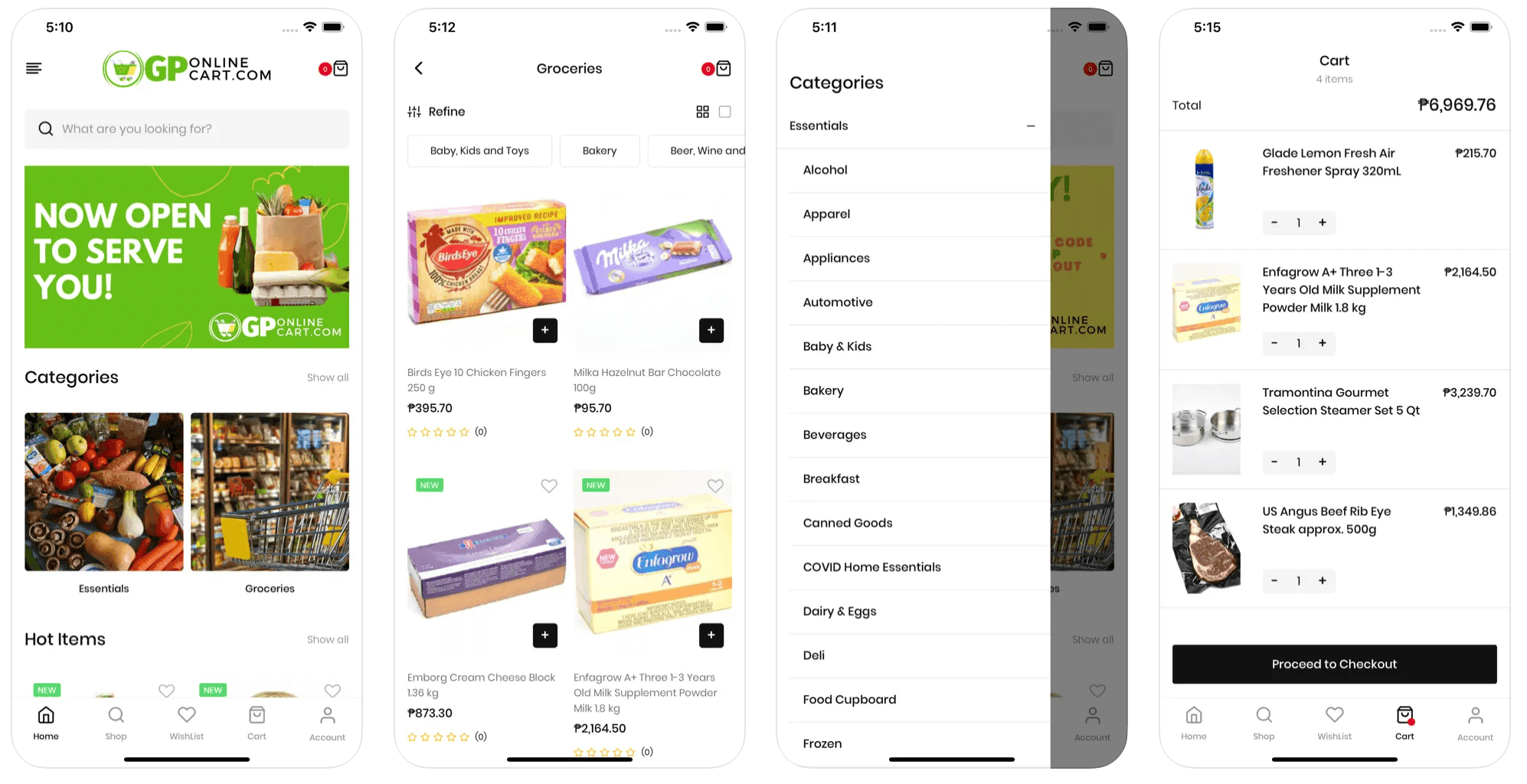
A 'What are you looking for?' box sits at the top of the home screen, above the banner and the categories, for the shopper who wants one specific brand and pack size rather than a browse.
Your #1 Technology Partner · Cainta, Rizal · 24/7 AI-assisted support
Retail & eCommerce
An online supermarket app where a household basket is built category by category and totalled before checkout.
GPOnlineCart.com is a supermarket that fits in a phone. The home screen opens on a search box, a promo banner and a Categories row where Essentials and Groceries sit beside a Show all link.
The brief
A supermarket catalogue has to hold things that behave nothing alike. A chocolate bar, a 1.8 kg pack of growing-up milk powder, a rib-eye steak sold by approximate weight and a five-quart steamer set all sit in the same store, and the shopper has to move between them without losing the thread. Some arrive knowing the exact brand and pack size they want; others would rather walk the aisles. One flat product grid serves neither. So GP Online Cart puts search at the top of the home screen, an expandable category tree underneath it, and the item count and running total at the top of the cart, because a long basket is only trusted while its owner can see what it costs.
What we built
A 'What are you looking for?' box sits at the top of the home screen, above the banner and the categories, for the shopper who wants one specific brand and pack size rather than a browse.
A Categories row of photo tiles with its own Show all link. Each tile opens its own shelf, so the catalogue is browsable from the first screen instead of only through a menu.
Essentials opens into an alphabetical list — Alcohol, Apparel, Appliances, Automotive, Baby & Kids, Bakery, Beverages, Breakfast, Canned Goods, COVID Home Essentials, Dairy & Eggs, Deli, Food Cupboard, Frozen and on. A minus control collapses it again so the list stays walkable.
A Hot Items shelf with its own Show all on the home screen, plus green NEW flags on listing cards, giving the store somewhere to put what it wants seen first.
Inside Groceries: a Refine filter control, a scrolling row of category chips such as Baby, Kids and Toys, Bakery and Beer, Wine and more, and a grid or single-column view switch.
Every card shows a peso price, a star rating and a plus button to add. The Cart screen lists a thumbnail, name and price per line with minus and plus quantity steppers, and puts the item count and total above Proceed to Checkout.
Yes. A category catalogue with search, refine, wishlist, cart and checkout is a Starter build at ₱99,000, live in about 5 working days. If you want a branded Android app alongside the store, the Pro package includes one and ships in about 10 working days; Business adds an iOS app as well, in about 15. Pro and Business are quoted after a short discovery call.
Unlimited listings and unlimited users, on every package. A supermarket catalogue runs to thousands of SKUs across dozens of categories, so billing you per product would make no sense. Add categories as your range grows without the price changing.
Yes. Every build includes online and offline payments, so a customer can pay by card or e-wallet in the app or hand over cash at the door. For a grocery basket that mix matters, because many Philippine households still prefer to settle at the gate.
Every VenderIT build includes a free lifetime 24/7 AI assistant. It handles the questions that come in at 11pm about stock, pack sizes, delivery areas and order status, so you are not losing a basket because nobody was awake to reply.
No. The admin panel and CMS come with the build, and so do training and documentation, so your own staff add products, change prices, run promos and update categories. Free cloud hosting, full SEO setup and one year of support are included as well.

Beauty & Wellness
A beauty creator's own app: a make-up reviews section, a look grid and a lifestyle mosaic feed.

Automotive
A used-car marketplace where buyers browse by brand and sellers list a car in minutes.
Restaurants & Food
A 24/7 silog delivery app with a buy-1-take-1 menu and PayMongo checkout.
Tell us how your business works. We will come back with scope, timeline and a price — packages start at ₱99,000.